Active Directory Under the Hood: What Actually Happens During Domain Authentication
A comprehensive deep dive into Active Directory domain authentication, breaking down how Kerberos and NTLM work under the hood, their message flows, and why their mechanisms matter to penetration testers and defenders.
1. Introduction
In a Windows enterprise environment, authentication is more than entering a username and password. The system must establish a user’s identity, while authorization determines which resources that identity is permitted to access.
Microsoft Active Directory Domain Services (AD DS) provides a centralized identity and directory infrastructure that enables organizations to manage users, computers, groups, and access to network resources. It also supports authentication mechanisms that allow domain users and computers to establish their identities across the environment.
From a security perspective, understanding how this process works is essential. Many Active Directory attack techniques exploit weaknesses in authentication protocols, credential handling, account configurations, or the permissions granted to authenticated identities.
In this article, we will examine what happens when a user authenticates in an Active Directory environment, how Kerberos and NTLM work, how they differ, and why their underlying mechanisms matter to penetration testers and red-team operators.
2. The Minimum Active Directory Fundamentals
Before examining authentication, we need to understand a few components that participate in the process.
2.1 What Is Active Directory Domain Services?
Active Directory Domain Services (AD DS) is Microsoft’s directory service for Windows domain environments. It stores information about directory objects, such as users, computers, and groups, and provides services that support centralized identity and access management.
For example, instead of maintaining a separate user account on every workstation, an organization can manage domain identities centrally and use them across supported domain resources.
AD DS also supports administrative features such as Group Policy, directory queries, and the organization of objects into a manageable structure.
2.2 What Is a Domain Controller?
A domain controller (DC) is a Windows Server system running AD DS. It maintains a replica of the domain directory and provides important domain services, including authentication-related services.
When a domain-joined computer needs to authenticate a user using domain credentials, it can communicate with an appropriate domain controller.
A domain controller is therefore an important component of the authentication process, but it is not the same thing as the user’s workstation or the resource the user wants to access.
2.3 What Is a Domain?
An Active Directory domain is an administrative and directory boundary containing objects such as user accounts, computer accounts, and groups.
For example, consider an organization with the domain corp.example.com. It might contain:
- A user account: alice
- A computer account: WS01$ (computer account names commonly end with $)
- A security group: IT-Admins
- A domain controller responsible for domain services
These objects allow the organization to manage identities, computers, and permissions within the domain.
The domain name is also relevant to finding domain services, which is one reason DNS plays an important role in Active Directory environments.
2.4 Why Does DNS Matter?
Domain-joined computers use DNS to locate important domain services, including domain controllers. Active Directory environments commonly publish service location records (SRV records) that help clients discover the services they need.
For example, a client may query DNS for records associated with LDAP or Kerberos to locate a suitable domain controller.
DNS does not authenticate the user. Instead, it helps the client discover the infrastructure needed to communicate with domain services.
2.5 Where Do LDAP and Kerberos Fit In?
LDAP (Lightweight Directory Access Protocol) is used to access and query directory information. An application or administrative tool may use LDAP to retrieve information about users, groups, computers, and other directory objects.
Kerberos, by contrast, is an authentication protocol. In Active Directory, it is the primary domain authentication protocol in typical configurations.
NTLM is another Windows authentication mechanism that remains relevant in environments where it is supported and used.
These technologies have different purposes:
- DNS: Helps locate domain services.
- LDAP: Provides access to directory information.
- Kerberos: Provides ticket-based authentication.
- NTLM: Uses a challenge-response authentication mechanism.
Understanding these distinctions prevents a common mistake: treating every protocol involved in Active Directory as though it performs the same function.
3. Authentication vs. Authorization
Authentication and authorization are related, but they answer different questions.
Authentication asks: Who are you?
It establishes or verifies an identity. In a domain environment, Kerberos or NTLM may participate in authenticating a user, depending on the situation and configuration.
Authorization asks: What are you allowed to access?
It determines whether an authenticated identity has permission to perform a particular action on a resource.
Consider a user who successfully signs in to a domain-joined workstation and then attempts to open a file on a company server.
Successful sign-in does not automatically grant access to every file on that server. The resource access request is evaluated against the applicable security context and permissions. For an SMB file share, these can include both share permissions and file-system permissions.
This distinction is especially important in Active Directory security assessments. An attacker might obtain valid credentials, but the impact depends on what those credentials allow the attacker to access and which additional paths are available.
Authentication establishes the identity; authorization governs access.
4. A Simplified View of Domain Authentication
With these fundamentals in place, consider the following high-level sequence:
- A user attempts to sign in to a domain-joined Windows computer.
- The computer uses the available domain configuration and discovery mechanisms to locate the required domain services.
- The authentication process establishes the user’s domain identity using the applicable authentication mechanism.
- Windows creates or updates the relevant local security context for the sign-in.
- When the user requests a network resource, the client and service perform the necessary authentication and authorization checks for that resource.
The exact sequence depends on whether the operation is an interactive domain sign-in, access to a remote service, or another authentication scenario.
This is where the underlying protocols become important. What information is exchanged? How does a client prove its identity? What role does the domain controller play? How are credentials or tickets used?
To answer these questions, we need to examine the two Windows authentication mechanisms that form the focus of this article: Kerberos and NTLM.
5. Kerberos Authentication
Kerberos is a ticket-based network authentication protocol that supports mutual authentication. It has been the primary domain authentication protocol in typical Active Directory environments since Windows 2000.
Rather than sending the user’s password to each network service, Kerberos uses tickets and session keys to support authentication. The protocol can provide mutual authentication, although whether it is performed depends on the exchange and application.
Before examining the Kerberos authentication flow, let’s understand the key components and terms involved.
5.1 Basic Terminologies
-
1. Realm — An administrative domain that defines the scope in which a Kerberos authentication authority manages identities. In Active Directory, the Kerberos realm commonly corresponds to the DNS domain name in uppercase, such as CORP.EXAMPLE.COM.
-
2. Principal — A uniquely named identity known to Kerberos, representing a user, computer, or service. For example, alice@CORP.EXAMPLE.COM.
-
3. Key Distribution Center (KDC) — The trusted Kerberos authority responsible for issuing tickets. It logically consists of the Authentication Server (AS), Ticket Granting Server (TGS), and relevant account and key information.
-
4. Authentication Server (AS) — The KDC component that handles the client’s initial authentication and issues a Ticket Granting Ticket (TGT).
-
5. Ticket Granting Server (TGS) — The KDC component that accepts a valid TGT and issues a service ticket for the requested service.
-
6. Ticket Granting Ticket (TGT) — A ticket that allows an authenticated client to request additional service tickets without re-entering their password for every service.
-
7. Service Ticket — A ticket issued for a particular service. The client presents it to the target service when requesting access.
-
8. Long-Term Key — A relatively persistent secret associated with a principal. A user’s key is derived from their password, while a service principal has a corresponding service key.
-
9. Session Key — A cryptographic key generated for a particular Kerberos exchange or session, depending on the context. For example, a client and service use a shared session key to support authentication.
-
10. Authenticator — Data sent alongside a ticket, typically including the client’s identity and a timestamp, protected with the appropriate session key. It helps demonstrate possession of the session key and helps defend against replay attacks.
5.2 Kerberos Protocol Messages
The following message pairs will appear throughout the authentication flow. The equations and field lists in this section are simplified teaching models, not complete encodings of the Kerberos protocol messages:
-
AS-REQ / AS-REP — The request and response messages used in the initial Authentication Server exchange to obtain a TGT.
-
TGS-REQ / TGS-REP — The request and response messages used to obtain a service ticket from the Ticket Granting Server.
-
AP-REQ / AP-REP — Messages used during application-server authentication. AP-REQ carries the service ticket and authenticator; AP-REP may be used when mutual authentication is requested or required. Not every application exchange includes an AP-REP.
5.3 Kerberos Operations
With these terms in place, we can examine the main stages of a typical Kerberos authentication flow. The sections below describe the messages exchanged between the client and the KDC, and between the client and the target service.
In the usual service-ticket flow, the client obtains a service ticket from the KDC and presents it to the application server. The application server can validate that ticket using its service key; it does not need to contact the KDC for every ticket presentation.
The high-level Kerberos exchange can be summarized as follows:
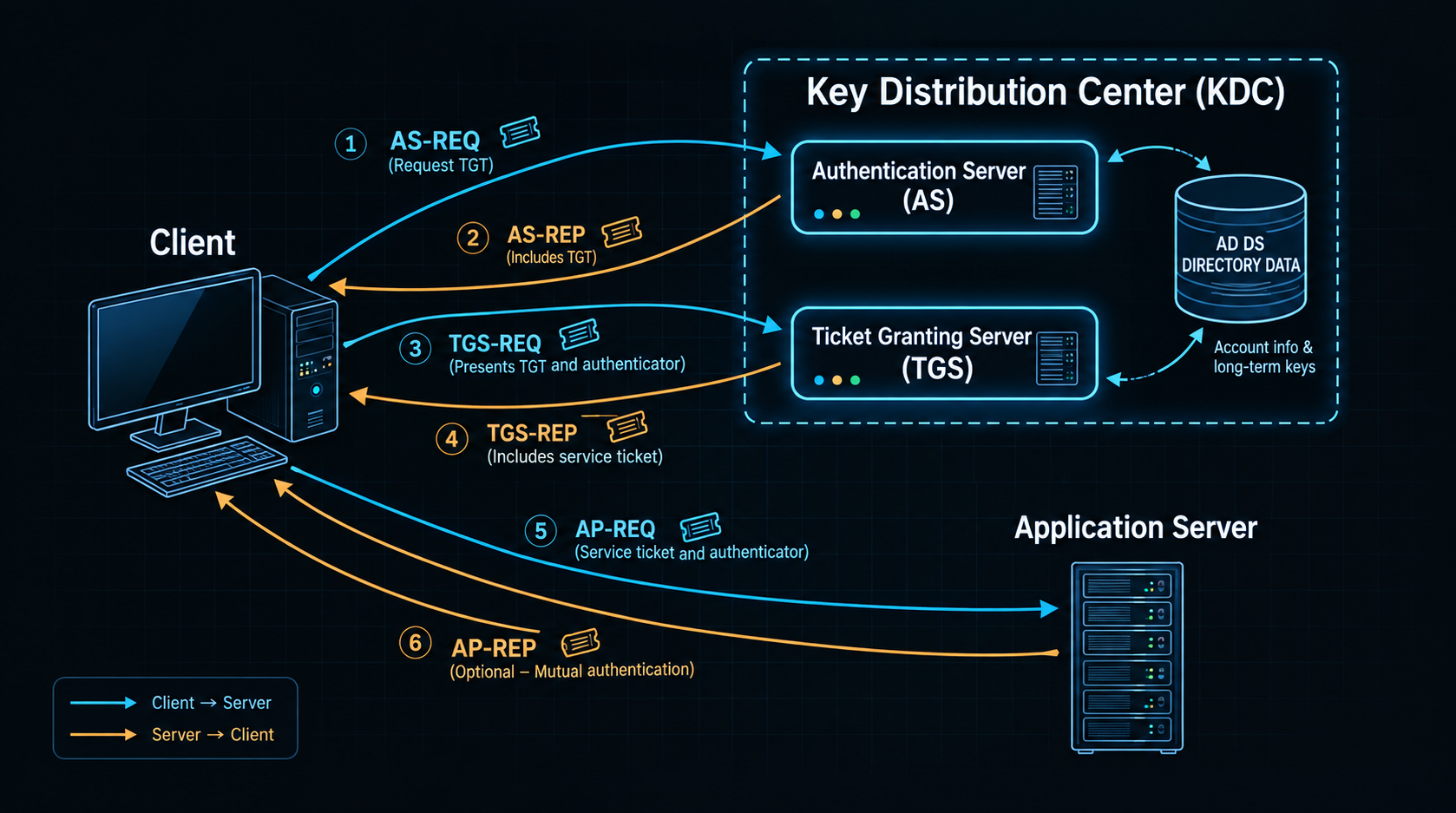
This is a conceptual sequence. The exact exchanges and fields depend on the Kerberos implementation and application.
Let’s examine each phase in detail.
1. Authentication Server Request (AS-REQ)
The Kerberos exchange starts when the client (for example, kinit) contacts the KDC’s Authentication Server (AS) to request a Ticket Granting Ticket (TGT). For conceptual purposes, the request can be represented as follows. This is not a literal wire-format definition of an AS-REQ:
AS_REQ = (PrincipalClient, PrincipalService, IP_list, Lifetime)
The fields represent the following information:
- PrincipalClient identifies the user requesting authentication, such as alice@EXAMPLE.COM.
- PrincipalService identifies the service for which a ticket is requested. For a typical TGT request, this is krbtgt/REALM@REALM.
- IP_list contains the IP addresses of the machines on which the resulting ticket may be used.
- Lifetime specifies the maximum ticket-validity period requested by the client.
Implementation note — requested service: In the usual Active Directory flow, the client requests a TGT first and then requests service tickets from the TGS. Some Kerberos implementations and tools support other request patterns, but those are outside the standard flow described in this article. For example, MIT Kerberos 1.3.6 supported requesting a service ticket directly with:
kinit -S imap/mbox.example.com@EXAMPLE.COM alice@EXAMPLE.COM
Note — client addresses: The simplified IP_list field is optional and may be empty, so a ticket is not necessarily bound to a particular client IP address. Address restrictions can affect whether a ticket is accepted, but they are not the central feature of the typical Active Directory Kerberos flow.
2. Authentication Server Reply (AS-REP)
After receiving an AS-REQ, the KDC checks the request and applies the account’s authentication requirements, including whether pre-authentication is required. If the request is valid and the required checks succeed, the AS prepares the response. The simplified stages below illustrate the main concepts rather than every protocol field or validation rule.
I. Generate the client–TGS session key
The AS generates a random session key for communication between the client and the Ticket Granting Service (TGS). In the notation used here, this key is called SK_TGS.
II. Build the Ticket Granting Ticket
The AS builds a TGT containing information such as the user’s principal, the ticket-granting service principal (usually krbtgt/REALM@REALM), validity information, optional client-address information, and SK_TGS. The following is a simplified representation, not the complete Kerberos ticket structure:
TGT = ( PrincipalClient, krbtgt/REALM@REALM, IP_list, Timestamp, Lifetime, SK_TGS )
The ticket contains identity and service information together with validity data and the session key. The exact fields and their values are determined by the Kerberos exchange and applicable policy.
III. Assemble the AS-REP
The AS sends back two protected parts:
- The client-readable encrypted part contains information such as the service principal, validity data, and SK_TGS. It is encrypted with the long-term key associated with the user, represented here as K_User.
- The TGT is encrypted with the long-term key belonging to the TGS principal, represented here as K_TGS.
Using this notation, the response is:
AS_REP = { PrincipalService, Timestamp, Lifetime, SK_TGS }_K_User { TGT }_K_TGS
The response may look repetitive, but each encrypted part serves a different purpose:
- The client can decrypt the part protected with its own long-term key.
- The client cannot decrypt the TGT because it is protected with the TGS’s key.
- The client-readable part therefore carries the session key and related information the client needs, while keeping the TGT’s contents protected.
To process the AS-REP, the client derives a key from the user’s password using the Kerberos string-to-key procedure and applicable parameters, including the salt when required. It uses this derived key to decrypt the client-readable part. If the password and parameters are correct, the client recovers SK_TGS and stores it with the still-encrypted TGT in its credential cache. These cached credentials can then be used to request service tickets without repeating the initial authentication exchange for every service.
Note — ticket lifetime: Ticket validity is governed by the ticket’s start and end times and by applicable KDC and account policies. The exact limits depend on the ticket type, configuration, and Kerberos implementation.
Key distinction: K_TGS and SK_TGS are not the same key. K_TGS is the long-term key used to protect the TGT; SK_TGS is the session key shared by the client and TGS after the AS exchange.
3. Ticket Granting Server Request (TGS-REQ)
After initial authentication, the client’s credential cache holds the TGT and its session key, SK_TGS. When the user requests a service for which no service ticket is cached, the client sends a TGS-REQ to the Ticket Granting Service. It prepares the request as follows:
I. Create an authenticator
The client creates an authenticator containing the user’s principal and a timestamp from the client machine. It encrypts these fields with SK_TGS, the session key shared with the TGS:
Authenticator = { PrincipalClient, Timestamp }_SK_TGS
The TGS uses the session key recovered from the TGT to validate this authenticator.
II. Construct the TGS-REQ
The request identifies the target service and includes an authenticator and the existing TGT. The TGT remains protected with the KDC’s long-term key. The actual Kerberos message contains additional fields and protections not represented by this simplified model.
TGS_REQ = (PrincipalService, Lifetime, Authenticator) { TGT }_K_TGS
The client forwards the TGT received from the AS without decrypting or rebuilding it, adding a fresh authenticator to demonstrate possession of SK_TGS.
4. Ticket Granting Server Reply (TGS-REP)
When a TGS-REQ arrives, the TGS validates the request and the TGT. It decrypts the TGT using the long-term key associated with krbtgt/REALM@REALM, retrieves SK_TGS, and uses that session key to validate the authenticator. The following list summarizes important checks; it is not an exhaustive protocol specification.
Before issuing a service ticket, it verifies that:
- The TGT has not expired.
- The client principal in the authenticator matches the client principal recorded in the TGT.
- The authenticator has not expired and has not already appeared in the replay cache.
- If the ticket contains an IP address list, the source address of the TGS-REQ matches one of the addresses in that list.
Together, these checks help confirm that the request matches the TGT and that the sender possesses the associated session key. If validation succeeds, the TGS prepares the service-ticket response.
I. Generate a client–service session key
The TGS generates a new random session key for use between the client and the target application service. This key is referred to here as SK_Service.
II. Create the service ticket
The service ticket contains information such as the client and target service principals, validity data, optional client-address information, and SK_Service. This simplified representation omits other fields present in a real Kerberos ticket:
T_Service = ( PrincipalClient, PrincipalService, IP_list, Timestamp, Lifetime, SK_Service )
In the model described here, the service ticket’s lifetime cannot exceed either the remaining lifetime of the TGT or the lifetime permitted for the service principal.
III. Build the TGS-REP
The TGS returns two parts:
- The client-readable portion contains the service principal, timestamp, lifetime, and SK_Service. It is encrypted with SK_TGS, which the client already has.
- The service ticket, T_Service, is encrypted with the long-term key belonging to the target service, represented as K_Service.
A simplified representation of the response is:
TGS_REP = { PrincipalService, Timestamp, Lifetime, SK_Service }_SK_TGS { T_Service }_K_Service
On receiving the TGS-REP, the client uses cached SK_TGS to decrypt the client-readable part and recover SK_Service. It stores the session key and service ticket in its credential cache. The ticket remains encrypted, so the client can forward it to the application server without reading its protected contents.
5. Application Request (AP-REQ)
Once it has a service ticket and the matching session key, the client can send an AP-REQ to the application server to request a resource. Unlike the AS and TGS exchanges, how credentials are presented in an AP-REQ can depend on the application and its implementation. The example below shows one simplified approach.
I. Create an authenticator for the service
The client creates an authenticator containing its principal and a timestamp, then encrypts it with SK_Service, the session key shared with the application service:
Authenticator = { PrincipalClient, Timestamp }_SK_Service
II. Send the AP-REQ
The client sends the authenticator together with the service ticket. The ticket is encrypted with the long-term key associated with the target service, represented here as K_Service:
AP_REQ = Authenticator { T_Service }_K_Service
The application server uses its service key to decrypt the ticket, extracts SK_Service, and then decrypts the authenticator. To validate the request, it checks that:
- The service ticket has not expired.
- The client principal in the authenticator matches the client principal recorded in the ticket.
- The authenticator has not expired and has not already been seen in the replay cache.
- If the ticket contains an IP address list, the source IP address of the AP-REQ matches an address in that list.
If these checks pass, the server has evidence that the request matches the ticket and that the client possesses the associated session key. The application then applies its authorization rules to decide which resources or actions the user may access.
Note: These checks resemble the TGS’s validation of a TGS-REQ. The TGS is itself a service—one that accepts a TGT and proof of possession of its session key before issuing a service ticket.
6. Pre-Authentication
The AS-REP flow highlights a security risk that can arise when an account does not require Kerberos pre-authentication. In that configuration, someone who knows the account name may be able to request an AS-REP without first proving knowledge of the user’s secret. The KDC’s response can contain encrypted material protected using a key derived from the user’s password.
This does not automatically give the requester the plaintext password or a usable TGT. However, the encrypted client portion of the AS-REP can be tested offline against password guesses. This is the basis of AS-REP roasting: an attacker obtains the relevant AS-REP material for an account without required pre-authentication and attempts to crack it offline.
Pre-authentication strengthens the initial exchange by requiring the client to provide proof associated with its long-term key before the KDC issues the normal AS-REP. If the account requires pre-authentication and the request omits the required data, the KDC returns an error indicating that pre-authentication is needed.
In the timestamp-based method described here, the client:
- Derives the user’s long-term key from the password using the Kerberos string-to-key process and applicable parameters, including the salt when required.
- Encrypts a timestamp with that key and resubmits the request with the pre-authentication data.
The KDC uses the user’s long-term key to decrypt and validate the timestamp. If decryption succeeds and the timestamp falls within the permitted clock-skew tolerance, the KDC accepts the proof and continues the authentication exchange.
Pre-authentication behavior depends on account settings, KDC policy, and implementation. In Active Directory, domain accounts normally require Kerberos pre-authentication, but an account can be configured not to require it. For security assessments, verify the actual account configuration rather than assuming a default.
6. NTLM Authentication
6.1 What Is NTLM?
NTLM (NT LAN Manager) is a family of Windows authentication protocols that uses a challenge-response mechanism. It remains relevant for compatibility and in environments where Kerberos cannot be used or is not selected by the application.
Unlike Kerberos, NTLM does not use a KDC-issued service ticket for each target service. Instead, the client proves knowledge of credential-derived secret material by computing a response to a challenge. The password itself is not normally sent over the network, but this does not make every NTLM exchange safe: captured responses may be susceptible to offline guessing, and some configurations can permit relay attacks.
NTLM has evolved over time. NTLMv2 is substantially stronger than the legacy LM and NTLMv1 mechanisms, which should be disabled wherever possible. The flow below focuses on the common NTLMv2 challenge-response exchange; implementation details and negotiated features can vary.
6.2 NTLM Challenge-Response Flow
NTLM authentication is commonly described as a three-message exchange: NEGOTIATE, CHALLENGE, and AUTHENTICATE. These are NTLM protocol messages, often carried within an application protocol such as SMB or HTTP.
1. Negotiate Message (NEGOTIATE_MESSAGE)
The exchange begins when the client requests access to a service that is using NTLM authentication. The client sends a NEGOTIATE_MESSAGE to the server.
Conceptually, this message communicates:
- Supported capabilities and flags — Features the client can support, such as the NTLM version, signing or sealing capabilities, and other negotiated options.
- Domain or workstation information — Some client implementations may include identifying strings, depending on the negotiated format and configuration.
- Protocol version information — Information that helps the parties determine which features and mechanisms can be used.
A simplified representation is:
NEGOTIATE_MESSAGE = { NegotiationFlags, OptionalDomainName, OptionalWorkstationName }
This is a teaching model, not a complete NTLM message structure. The message does not itself prove that the user knows the account secret. It begins the negotiation and establishes which capabilities may be used in the following exchange.
2. Challenge Message (CHALLENGE_MESSAGE)
After receiving the negotiate message, the server responds with a CHALLENGE_MESSAGE. It includes a server-generated challenge and may include target information describing the server or authentication target.
Important elements include:
- Server challenge — A fresh, unpredictable value, commonly eight bytes in the NTLM message structure. The client must incorporate it into the response.
- Target name and target information — Values that can identify the server and provide context for NTLMv2 response calculation, depending on the exchange.
- Negotiated flags — The features selected for this exchange.
A simplified representation is:
CHALLENGE_MESSAGE = { NegotiatedFlags, ServerChallenge, TargetName, TargetInfo }
The challenge is not the user’s password or password hash. Its purpose is to make the client’s response specific to this authentication exchange, which helps prevent a previously captured response from being reused unchanged against a different challenge.
3. Authenticate Message (AUTHENTICATE_MESSAGE)
After receiving the challenge, the client calculates a response using secret material derived from the user’s credentials. In a typical NTLMv2 exchange, the client uses the NT password hash as an input to derive an NTLMv2 key, then calculates a proof that incorporates the server challenge and additional client and target data.
At a conceptual level, the NTLMv2 calculation involves:
- Derive the NT password hash — Windows derives the NT hash from the password. This hash is credential-related secret material, not a plaintext password.
- Derive the NTLMv2 key — The NT hash is combined cryptographically with the user’s identity information, including the username and domain, to derive the NTLMv2 key.
- Create the response data — The client generates a client challenge and includes data such as a timestamp and target information in the NTLMv2 response blob.
- Calculate the proof — A keyed hash calculation binds the response to the server challenge and the response data.
- Send the authentication message — The client sends an AUTHENTICATE_MESSAGE containing the account identity fields and response material. Depending on the negotiated options, it may also include session-key-related data and other fields.
A simplified representation is:
NTLMv2_Response = { ResponseProof, ResponseBlob } AUTHENTICATE_MESSAGE = { DomainName, UserName, WorkstationName, NTLMv2_Response, OptionalSessionKeyData, NegotiatedFlags }
The names and grouping above are conceptual. The real message format contains additional fields and depends on the negotiated protocol features.
The key point is that the client does not simply send the password to the server. It sends a response calculated from credential-derived secret material and the challenge. A server that can validate the response can establish that the client likely possesses the relevant secret, assuming the protocol and configuration have not been compromised.
4. Validate the Response
The server must determine whether the response is valid. The validation path depends on the type of account and the environment.
- Local account authentication: The server can validate the response against the local account database and its stored credential material.
- Domain account authentication: The server commonly relies on a domain controller to validate the response. In a typical pass-through authentication path, the server forwards the relevant authentication information to a domain controller over the secure Netlogon channel.
- Validation result: The server receives a success or failure result and uses it to decide whether authentication succeeded.
For domain authentication, the domain controller uses the domain account’s secret material to validate the response. The domain controller does not need the plaintext password to perform this check.
A simplified view is:
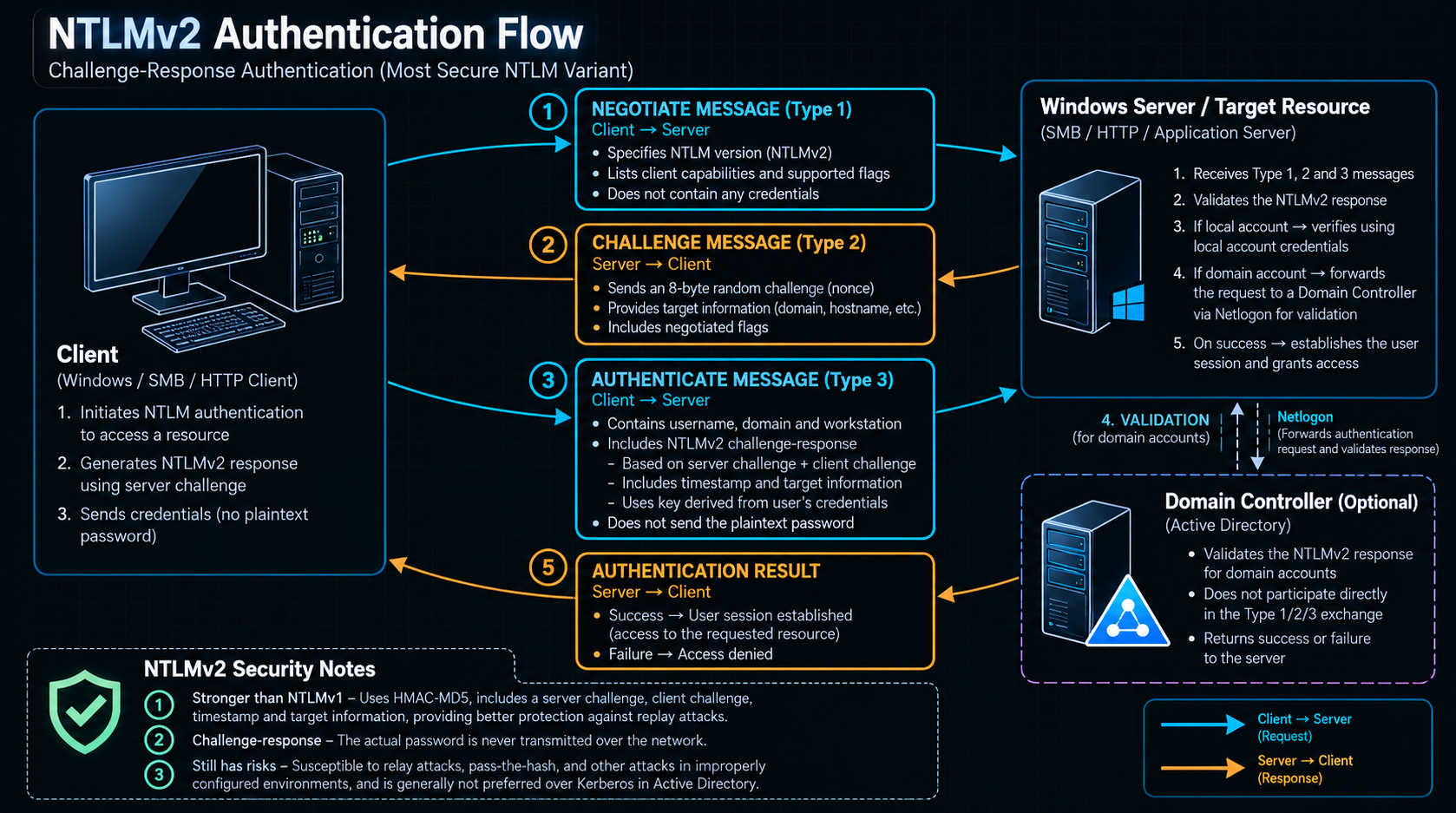 This diagram represents the common domain pass-through case. Local accounts and some application-specific authentication paths do not follow this exact route.
5. Establish the Application Security Context
If validation succeeds, the server establishes the authenticated security context for the connection or application session. Depending on the negotiated flags and application protocol, NTLM may also derive session-key material that supports message signing, sealing, or related session protections.
Authentication success does not automatically grant access to every resource. The application or operating system still evaluates authorization rules, group membership, access control lists, and any additional policy relevant to the requested operation.
This is an important distinction: NTLM establishes or supports the identity check; it does not replace authorization.
6.3 The Role of the Domain Controller in NTLM Authentication
A domain controller is not necessarily the system that the user is connecting to. For example, a user may access a file share hosted on FILE01, while the domain controller validates the user’s domain credentials behind the scenes.
In a common domain NTLM flow:
- The client and target server exchange the NTLM negotiation, challenge, and authentication messages.
- The target server obtains the response that must be validated.
- The server asks a domain controller to validate the domain authentication using the appropriate secure domain channel.
- The domain controller checks the response against the domain account’s credential material and returns a result.
- The target server uses that result to complete authentication, then evaluates authorization for the requested resource.
The server does not normally need to receive or store the user’s plaintext password to complete this process. However, NTLM authentication depends on secret material that must be protected carefully, and the exact implementation can differ between local and domain accounts and between application protocols.
6.4 Important NTLM Security Considerations
NTLM is not automatically exploitable whenever it is present, but it has security limitations that defenders and penetration testers should understand.
- Offline password guessing: If an attacker obtains suitable NTLM challenge-response material, they may be able to test password guesses offline. Strong, unique passwords and modern authentication controls reduce this risk.
- NTLM relay: In some configurations, an attacker positioned to intercept or relay authentication can forward an NTLM exchange to another service. Whether this succeeds depends on protections such as SMB signing, Extended Protection for Authentication (EPA), channel binding, service configuration, and other controls.
- Legacy protocol support: LM and NTLMv1 are outdated and should be disabled where possible. NTLMv2 is the preferred NTLM variant when NTLM cannot yet be eliminated, but it is not a substitute for a well-designed Kerberos-based environment.
- Limited mutual authentication: NTLM does not provide the same Kerberos-style mutual-authentication model. Applications must not assume that successful NTLM client authentication proves the client has securely verified the server’s identity.
- Credential reuse and exposure: Reuse of passwords and exposure of credential-derived secrets can increase the impact of compromise. Restrict administrative logons and protect systems where privileged credentials may be used.
The appropriate defensive goal is to reduce unnecessary NTLM usage, disable obsolete variants, enforce protections appropriate to the services in use, and investigate unexpected NTLM activity. Where NTLM remains necessary for compatibility, its use should be understood, monitored, and restricted rather than treated as inherently safe or inherently vulnerable.
7. Kerberos vs. NTLM
Kerberos and NTLM both support Windows authentication, but they establish identity in different ways. Kerberos relies on tickets issued by a trusted KDC, while NTLM relies on a challenge-response exchange.
7.1 Key Differences
| Aspect | Kerberos | NTLM |
|---|---|---|
| Core mechanism | Ticket-based authentication | Challenge-response authentication |
| Main components | Client, KDC, and target service | Client, target server, and a validation authority when required |
| Proof presented to service | A service ticket and authenticator | A challenge-response authentication message |
| Service-specific credentials | Uses a ticket issued for the target service principal | Does not use Kerberos-style service tickets |
| Mutual authentication | Supported through the protocol; commonly demonstrated with AP-REQ/AP-REP when used | Does not provide an equivalent Kerberos-style mutual-authentication model |
| Password handling | The user’s password is not sent to each service; keys and tickets support the exchange | The plaintext password is not normally sent; a response is calculated from credential-derived secret material |
| Dependency | Requires KDC availability to obtain tickets; cached tickets may be used until their validity limits | Can validate local accounts locally; domain account validation commonly involves a domain controller |
| Common operational issue | SPN problems, clock skew, ticket or service-account configuration | Legacy compatibility, relay exposure, and weaker properties than Kerberos in some scenarios |
| Security focus | Protect tickets and keys, secure service accounts, monitor ticket abuse, and maintain sound KDC configuration | Reduce use, disable LM/NTLMv1, enforce relay protections, and monitor authentication attempts |
Neither protocol makes an environment secure by itself. Risk depends on implementation, configuration, account hygiene, endpoint security, and the protections enforced by the application protocol.
7.2 When Kerberos or NTLM May Be Used
In a typical Active Directory domain environment, Kerberos is the preferred protocol for domain authentication. It is especially useful when the client can obtain a ticket for the target service and the service is correctly configured to accept it.
NTLM may still be used in situations such as:
- A legacy application or service that relies on NTLM.
- A connection where Kerberos cannot be negotiated or the required service identity information is not available or correctly configured.
- Some workgroup or local-account authentication scenarios.
- Environments where compatibility requirements have prevented NTLM from being fully disabled.
The protocol selected for a connection is influenced by the application, the server and client configuration, the account type, and the authentication options available. Seeing NTLM in a network trace does not by itself prove a vulnerability; it is a reason to understand why NTLM was selected and whether that use is necessary and adequately protected.
7.3 Security Implications
From a security perspective, the difference is not simply that Kerberos is “secure” and NTLM is “insecure.” Kerberos has its own attack surface, including poorly protected tickets, weak service-account passwords, misconfigured service principals, and compromised long-term keys. NTLM has distinct risks related to challenge-response material, relay opportunities, and legacy protocol support.
A useful assessment asks:
- Which protocol is being used, and why?
- Is the account or service configured securely?
- Are credentials, keys, and tickets protected against theft or misuse?
- Are relay protections and signing requirements enabled where appropriate?
- Are authentication events logged and reviewed?
- Can unnecessary NTLM usage be removed without breaking required services?
These questions turn protocol knowledge into practical security analysis without assuming that a protocol’s presence alone proves an exploitable weakness.
8. Why Domain Authentication Matters to Penetration Testers
Understanding Kerberos and NTLM is not just about learning how Windows authenticates users. It helps a penetration tester interpret authentication activity, recognize risky configurations, and understand how compromised credentials or tickets could affect a domain environment.
During an authorized Active Directory assessment, protocol knowledge helps frame questions such as:
- Are there accounts that do not require Kerberos pre-authentication?
- Are service accounts configured with strong, unique secrets and appropriate privileges?
- Is NTLM still required, and are protections against relay attacks configured?
- Are privileged credentials exposed on systems where they do not need to be used?
- Do authentication logs reveal unusual failures, ticket requests, or unexpected NTLM use?
Each potential issue has prerequisites and context. A finding should be supported by evidence, its impact should be evaluated against the permissions available to the affected identity, and the recommended remediation should address the underlying configuration or control weakness.
This article has focused on how the two authentication mechanisms work. The next article in the series will move from protocol fundamentals to the attack techniques that target authentication weaknesses, explaining their prerequisites and defensive implications in a controlled, authorized testing context.
9. Conclusion
Kerberos and NTLM are two different mechanisms that Windows environments can use to authenticate identities. Kerberos uses a ticket-based exchange involving a KDC, a TGT, and service tickets. NTLM uses a challenge-response exchange in which the client proves knowledge of credential-derived secret material without normally sending the plaintext password across the network.
Understanding the messages exchanged by each protocol makes it easier to reason about authentication failures, service access, credential exposure, and the security controls that reduce risk. It also reinforces an essential distinction: successful authentication establishes an identity, but authorization determines what that identity is allowed to do.
For defenders, the objective is to use modern authentication securely, protect credentials and tickets, remove legacy protocol use where feasible, and monitor authentication behavior. For penetration testers, the objective is to identify and validate weaknesses carefully, understand their prerequisites, and report their real impact rather than treating protocol presence as proof of compromise.
10. What Comes Next?
In the next article, we will examine how attackers may abuse weaknesses in Active Directory authentication, including Kerberos-related attacks and NTLM relay scenarios. We will focus on the conditions that make each technique possible, how to assess its impact in a lab, and which defensive controls can prevent or detect it.
The goal is to move from understanding the authentication process to understanding how that process can fail—and how to assess those failures responsibly.